
FieldBuddy Go is used daily by hundreds of companies with a field service team.
Without FieldBuddy Go
Work orders get lost, smudged or filled in late
Quality depends on the technician's memory
The office waits days for paperwork before invoicing
With FieldBuddy Go
Everything in the same template
Add photos, parts and signatures to the work order
Completed jobs land in the office in real time, ready to invoice
Step 1
When an order comes in, FieldBuddy Go creates a work order with the right layout, checklist and required fields, based on the type of work, the installation or the customer contract.
Step 2
Smart forms guide the technician step by step. Required fields prevent missing data, dynamic sections show only what is relevant, and photos plus signatures are added directly to the work order.
Step 3
As soon as the last field is filled in and the customer has signed, the work order is complete. It automatically goes back to the planning board.
NEXT · AFTER THE JOB
The signed work order goes straight to the back office. No retyping, no chasing paperwork.
After the jobCORE DIGITAL WORK ORDER FEATURES
Strong, practical tools first. This is the foundation your field service runs on.
WORK ORDERS
Different jobs need different work orders. FieldBuddy Go lets you set up multiple work order layouts, by service type, installation or business unit, and applies them automatically. Validation rules stop errors before they happen.
Multiple work order templates per service type
Pre-filled parts, activities and time entries based on the job
Validation rules to catch missing or incorrect data
One unified history per customer and per asset

CHECKLISTS & FORMS
Build your own checklists and forms with drag-and-drop, for safety checks, installations, inspections or contract obligations. Sections appear and disappear based on what the technician enters, so the form stays short and organised.
Drag-and-drop form builder, no developer needed
Dynamic sections that adapt to the technician's input
Required fields, photo prompts and digital signatures
One source of truth for audits, certifications and warranty claims

FIELDBUDDY AI
Everything above works without AI. Switch it on, and FieldBuddy Go starts thinking along: it calculates, proposes and replans in the background. AI proposes, your planner decides.
For the planner
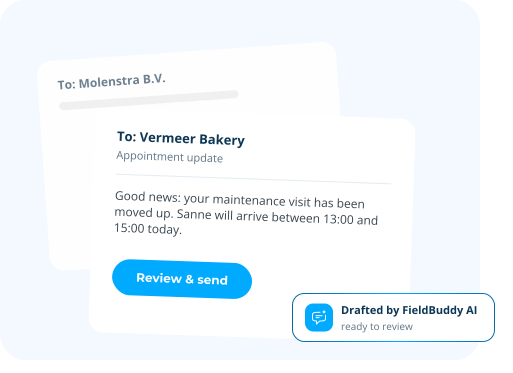
Two appointments shifted, so two customers need to hear it. The status updates are drafted automatically in a professional tone. The planner reviews and sends. Every message looks right, without writing a word.
For the technician
Photograph the type plate and the serial number is filled in correctly, first time. No squinting at worn plates, no typos in your asset data.


For both
AI Planning supports AI-driven service planning and route optimisation, helping technicians follow the most efficient route between jobs and complete more work in less time.


For both
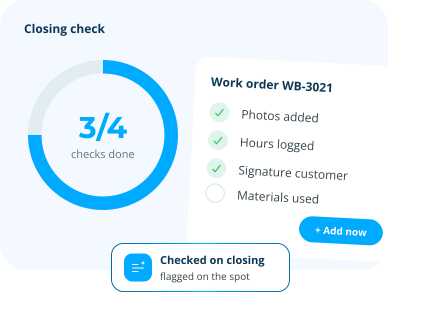
On closing, AI checks the work order is complete: photos, hours, materials, signatures. Missing items are flagged on the spot instead of days later at the back office. Fewer callbacks, fewer second visits, cleaner invoices.

For both
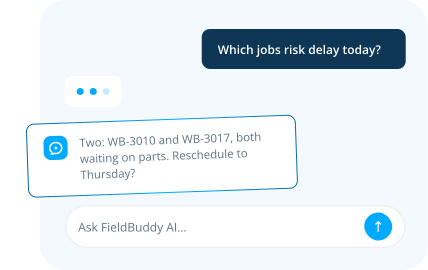
Ask anything about your service operation. The assistant has access to all your work orders and customer data, plus the full FieldBuddy help centre. Ask about a specific job, a customer's history, or how something in the product works. You get an answer in seconds, not after digging through screens.

For the technician
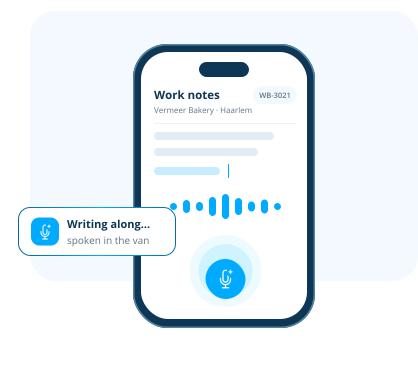
The technician speaks the report in the FieldBuddy Go app and it writes along. No more typing in the van, no more finishing work orders at the kitchen table. You see it working within seconds.

Willem den Baars
De Badmeesters
Digital work orders are one piece of the puzzle. Explore the features that carry your team from the first request to a job well done.
NEXT · AFTER THE JOB
A digital work order is the paper work order, but as a form in an app. The technician sees the job, the customer and the service history on their phone, then logs hours, materials, photos and the customer’s signature on site. Everything goes straight to the office, so nobody has to retype a thing.
Yes. In a basement, on a roof or out in a field with no coverage, the technician keeps working in the FieldBuddy Go app: open the job, log hours and materials, take photos, capture a signature and submit. Everything syncs as soon as there is a connection again, and when there is stable connection, the data refreshes itself every two minutes. Live stock levels and full asset history do need a connection. Locations without an address work on coordinates alone.
Yes, and that comes down to the app more than the technician. FieldBuddy Go shows the day in one list and one screen per job. Mandatory fields and smart fields guide what gets filled in, and a form such as an LMRA can be made compulsory before work starts. The barcode scanner means nobody types item numbers. There’s little to learn beyond the work itself.
The technician can still close the job. When submitting, they pick ‘not signed’ and give the reason, so the office knows exactly why there’s no signature. If the customer is there, they sign on the technician’s phone or tablet, next to a summary of the hours, materials and activities that were logged.
The app runs on Android 13 or later, iOS and iPadOS 18 or later, and Windows 11 from 23H2, and comes in Dutch, English and French. You download it from the App Store, Google Play or the Microsoft Store. On first launch you enter your environment’s registration number plus a device name. After that you log in with a username and password or through Azure SSO.




 call an expert

