
FieldBuddy Go is used daily by hundreds of companies with a field service team
Without FieldBuddy Go
Technicians leave home with printed sheets
Information gets lost between the van and the office
Customers have to call for updates
With FieldBuddy Go
Live planning overview, always in your pocket
Complete work order with photos and signature
The customer is kept informed automatically
Step1
As soon as a job is assigned, it appears in the app. All information about the customer and the job is already included in the work order.
Step2
The technician fills in the work order, goes through the checklist and scans parts. No signal? No problem, thanks to offline mode.
Step3
Everything is automatically synced back to the office. The customer can sign digitally and the technician sends the work order straight from the job.
NEXT · AFTER THE JOB
Keep every job on track from the back office: monitor progress, work orders, photos and signatures.
After the jobCORE APP FEATURES
Strong, practical tools first. This is the foundation your field service runs on.
Time registration
Work time, travel, breaks or commuting: technicians log their hours in the app while the job happens. Submit the work order and every registration lands in the back office, linked to the right job. No loose notes or timesheets afterwards.
Four types, one habit. Work time, travel time, breaks and commuting each get their own registration, so everyone sees where the day went.
Straight to the back office. Submit the job and the hours are in, neatly in decimals and ready to check.
Mileage travels along. Travel and commuting registrations carry their mileage records with them.
Appointments
Team meetings, training, stock counts or a day of leave: schedule them as appointments, right next to the jobs. Technicians see their full day in the app, and planners always know who is really available.
Everything in one agenda. Meetings, training and absence sit in the same scheduler as work orders, so the day’s plan is complete.
Log it like a job. Technicians register time, mileage and forms on appointments the same way they do on work orders.
Fixed or flexible. Set a fixed time when the start is confirmed, not an estimate, or schedule temporarily while the planning is still moving.
FIELDBUDDY AI
Everything above works without AI. Switch it on, and FieldBuddy Go starts thinking along: it calculates, proposes and replans in the background. AI proposes, your planner decides.
For the planner
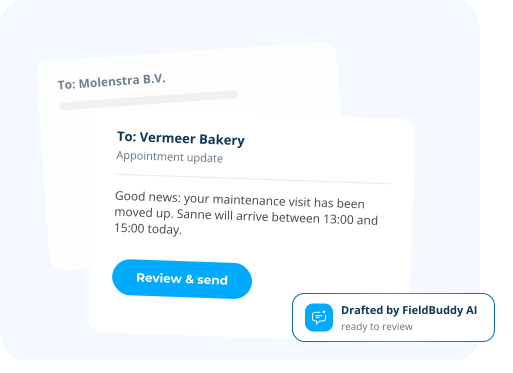
Two appointments shifted, so two customers need to hear it. The status updates are drafted automatically in a professional tone. The planner reviews and sends. Every message looks right, without writing a word.
For the technician
Photograph the type plate and the serial number is filled in correctly, first time. No squinting at worn plates, no typos in your asset data.


For both
AI Planning supports AI-driven service planning and route optimisation, helping technicians follow the most efficient route between jobs and complete more work in less time.


For both
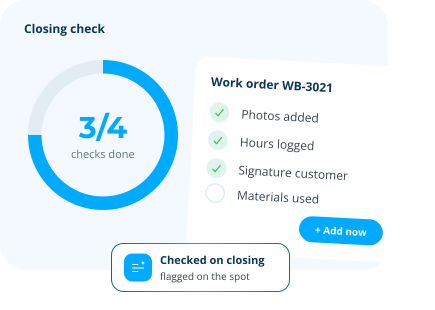
On closing, AI checks the work order is complete: photos, hours, materials, signatures. Missing items are flagged on the spot instead of days later at the back office. Fewer callbacks, fewer second visits, cleaner invoices.

For both
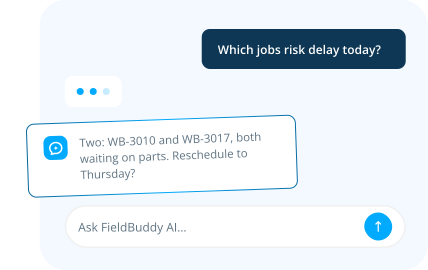
Ask anything about your service operation. The assistant has access to all your work orders and customer data, plus the full FieldBuddy help centre. Ask about a specific job, a customer's history, or how something in the product works. You get an answer in seconds, not after digging through screens.

For the technician
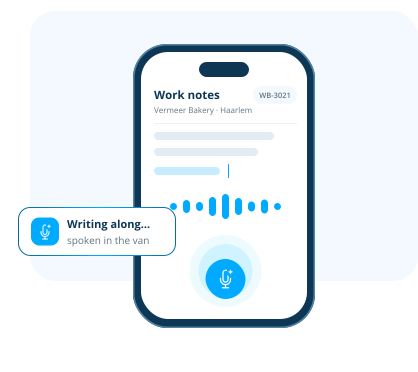
The technician speaks the report in the FieldBuddy Go app and it writes along. No more typing in the van, no more finishing work orders at the kitchen table. You see it working within seconds.

Albert Mulder
Alfa Melktechniek & Alfa Koeling
The Technician App is one piece of the puzzle. Explore the features that carry your team from the first request to a job well done.
See every job and technician on one live board. Assign in seconds and adjust the moment plans change.
ExploreTurn every job into a digital work order. Checklists, photos and signatures, all captured on site.
ExploreCustomers submit service requests through the portal. They track status, history, and reports themselves.
ExploreNEXT · AFTER THE JOB
A digital work order is the paper work order, but as a form in an app. The technician sees the job, the customer and the service history on their phone, then logs hours, materials, photos and the customer’s signature on site. Everything goes straight to the office, so nobody has to retype a thing.
Yes. In a basement, on a roof or out in a field with no coverage, the technician keeps working in the FieldBuddy Go app: open the job, log hours and materials, take photos, capture a signature and submit. Everything syncs as soon as there is a connection again, and when there is stable connection, the data refreshes itself every two minutes. Live stock levels and full asset history do need a connection. Locations without an address work on coordinates alone.
Yes, and that comes down to the app more than the technician. FieldBuddy Go shows the day in one list and one screen per job. Mandatory fields and smart fields guide what gets filled in, and a form such as an LMRA can be made compulsory before work starts. The barcode scanner means nobody types item numbers. There’s little to learn beyond the work itself.
The technician can still close the job. When submitting, they pick ‘not signed’ and give the reason, so the office knows exactly why there’s no signature. If the customer is there, they sign on the technician’s phone or tablet, next to a summary of the hours, materials and activities that were logged.
The app runs on Android 13 or later, iOS and iPadOS 18 or later, and Windows 11 from 23H2, and comes in Dutch, English and French. You download it from the App Store, Google Play or the Microsoft Store. On first launch you enter your environment’s registration number plus a device name. After that you log in with a username and password or through Azure SSO.





 call an expert


