
AI Planning is used daily by hundreds of companies with a field service team
Without FieldBuddy Go
Hours spent shuffling jobs around, every single day
One sick call and the whole planning falls apart
Skills, certifications and stock, your planner has to remember it all
With FieldBuddy Go
38% more efficient
The best technician on every job, scheduled in seconds
Unexpected absence or delay? The day reschedules itself, routes included
Certifications, stock and availability are counted automatically
Step1
A work order is created. AI Planning reads the job requirements: location, skill needs, preferred execution, and time window.
Step2
AI Planning finds the best technician for the job and plans the optimal moment. Stock in the van and availability are also taken into account.
Step3
All technicians get their planning in the app. Something changes? Then the whole planning updates automatically in real time.
NEXT ・ DURING THE JOB
The plan travels straight to the field: digital work orders, checklists, photos and signatures.
During the jobCORE PLANNING FEATURES
Strong, practical planning tools first. This is the foundation your whole field service runs on.
Order list
Open your order list in a separate window, then drag an order onto the right technician and time slot. Review the scheduling details and confirm to create your work orders—all while keeping your schedule in view.
Full overview, zero squeezing. Detach the order list and keep every technician’s day in view while you plan.
Find the right order fast. The list view adds advanced filtering and sorting on top of the standard filters.
Filters
One schedule can hold a lot. Filter the order list down to what needs attention, search on an order number or address, and save your favourite setup as a view. Switch from maintenance to service in one click, and the schedule and order list follow.
Saved views in one click. Save your technicians, filters and sorting as a view, like ‘Onderhoud’ or ‘Service’, and switch between them instantly.
Filter and search the order list. Tick the filters that matter or type an order number, address or location, and the list updates as you go.
FIELDBUDDY AI
Everything above works without AI. Switch it on, and FieldBuddy Go starts thinking along: it calculates, proposes and replans in the background. AI proposes, your planner decides.
For the planner
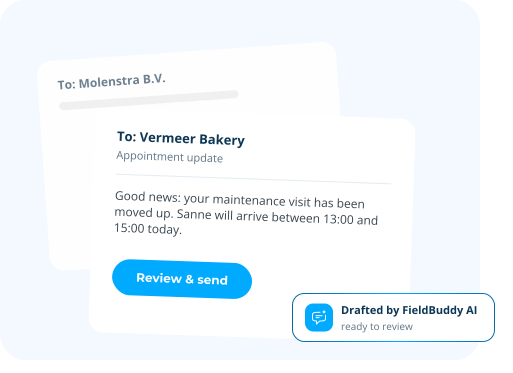
Two appointments shifted, so two customers need to hear it. The status updates are drafted automatically in a professional tone. The planner reviews and sends. Every message looks right, without writing a word.
For the technician
Photograph the type plate and the serial number is filled in correctly, first time. No squinting at worn plates, no typos in your asset data.


For both
AI Planning supports AI-driven service planning and route optimisation, helping technicians follow the most efficient route between jobs and complete more work in less time.


For both
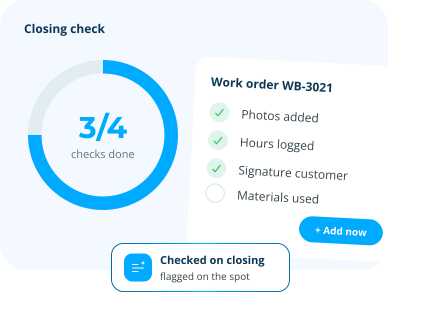
On closing, AI checks the work order is complete: photos, hours, materials, signatures. Missing items are flagged on the spot instead of days later at the back office. Fewer callbacks, fewer second visits, cleaner invoices.

For both
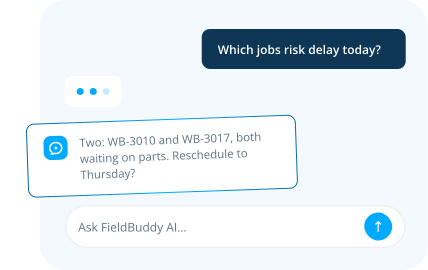
Ask anything about your service operation. The assistant has access to all your work orders and customer data, plus the full FieldBuddy help centre. Ask about a specific job, a customer's history, or how something in the product works. You get an answer in seconds, not after digging through screens.

For the technician
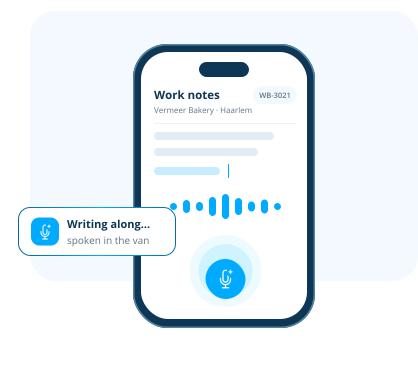
The technician speaks the report in the FieldBuddy Go app and it writes along. No more typing in the van, no more finishing work orders at the kitchen table. You see it working within seconds.

Miguel Sanchez
Artiso
AI Planning is one piece of the puzzle. Explore the features that carry your team from the first request to a job well done.
See every job and technician on one live board. Assign in seconds and adjust the moment plans change.
ExploreTurn every job into a digital work order. Checklists, photos and signatures, all captured on site.
ExploreCustomers submit service requests through the portal. They track status, history, and reports themselves.
ExploreNext: During the job - Technician App
AI planning is software that works out which technician goes to which job, and when. It weighs the skills the job needs, your technicians' working hours, what's already scheduled and the travel time between addresses, then comes back with a proposal. Work that takes a planner half a morning is calculated in seconds. You decide what actually gets scheduled.
No. AI planning makes a proposal, the planner reviews it and decides. You see which technician is proposed for each job and at what time. From there you schedule it definitively, park it as a temporary slot, or decline the proposals. The calculation moves to the software. The responsibility stays with the planner.
AI planning weighs more than distance: the skills the job requires, the technician's work schedule, the fixed start and end point of their day, what's already booked in, the travel time between addresses, the region, and the order's preferred execution date, with a margin of up to three months. On the same three jobs, our own example shows 24 kilometres less driving and 35 minutes saved per technician per day. If a job doesn't fit anywhere, you're shown the reason it dropped out.
You have FieldBuddy Go run the planning again for the technicians who are available and get fresh proposals back. For a gap later the same day, you ask for a plan suggestion on that open slot. What doesn't happen: today's schedule quietly rewriting itself. A technician already on the road won't get a different route halfway through the day.
FieldBuddy AI is the AI layer inside FieldBuddy Go, covering route optimisation and scheduling proposals. You select the orders, the period and the technicians, then start the calculation. It runs in the background, so you pick your next task back up while it works. Once the proposals are ready you get a notification, and you decide which ones to schedule.




 call an expert

